The backbone of enterprise identity, why managing it still feels stuck in 2003, and what it actually takes to harden, scale, and modernize AD operations.
Nobody gets excited about Active Directory anymore. The hype cycle is busy with Kubernetes clusters, multi-cloud control planes, zero-trust edge proxies, and serverless everything.
But walk into almost any mid-market enterprise, Fortune 500, or high-security datacenter and you'll find the same thing: AD is still the heartbeat of enterprise authentication. Your hypervisors, storage arrays, VPN concentrators, and legacy line-of-business apps, even the modern identity providers like Entra ID or Okta that supposedly replace it, all trace their root of trust back to domain controllers humming away in a server room.
That centrality is exactly what makes AD the ultimate Tier-0 asset. Compromise the domain, and you compromise the entire estate.
1. The Weight of Identity: Why AD Is the Ultimate Tier-0 Asset
Cloud-native thinking celebrates ephemeral, disposable infrastructure. Active Directory is the opposite: stateful, historically accumulated over years (sometimes decades), and wired into everything.

When an attacker lands on a network, phished credential, unpatched edge appliance, the playbook is nearly always the same:
- Dump local credentials (LSASS / SAM).
- Map the domain structure through LDAP queries.
- Walk the privilege escalation path to Domain Admin or Enterprise Admin.
And once someone controls your domain controllers, they don't just own Windows servers. They own your hypervisor clusters, your storage shares, your certificate authorities, and every SSO pipeline bridged into hybrid cloud.
2. Architecture, Resiliency & High Availability
High availability in AD is not "spin up two domain controllers and call it a day." Real resiliency means understanding replication mechanics, topology design, and role placement.
FSMO roles. AD replicates multi-master for most directory objects, but five critical operations still answer to a single master:
| Role | Scope | Where to put it |
|---|---|---|
| Schema Master | Forest-wide | Forest root PDC; restrict write access strictly |
| Domain Naming Master | Forest-wide | Colocate with Schema Master on a Global Catalog |
| PDC Emulator | Domain-wide | Reliable hardware, dedicated NTP sync |
| RID Master | Domain-wide | Colocate with the PDC Emulator |
| Infrastructure Master | Domain-wide | Flexible if all DCs are Global Catalogs (the norm today) |
Sites, subnets, replication. The Knowledge Consistency Checker auto-calculates the least-cost replication topology, but it's only as smart as your site definitions:
- Map every internal VLAN to an AD site. Unmapped subnets make clients pick random DCs, which means unpredictable cross-datacenter latency.
- For multi-datacenter or hybrid extensions, configure site links with realistic costs and schedules so replication storms don't eat your WAN.
The unbreakable coupling: AD and DNS. Roughly 90% of "Active Directory problems" are actually DNS misconfigurations:
- Use Active Directory-integrated DNS zones, and you get secure dynamic updates and multi-master replication of DNS records for free.
- Never point a DC's primary DNS at
127.0.0.1alone. Primary goes to a partner DC in the same site, secondary to loopback, otherwise you're setting up boot-time replication deadlocks.
3. Hardening & Modern Security Auditing
Securing AD isn't about ticking boxes on a compliance spreadsheet. It's about eliminating deterministic attack paths.

The tiering model. The rule is simple: never log into a lower tier with a higher-tier account. The moment a Tier-0 admin logs into a compromised workstation, their credentials land in LSASS memory, waiting to be scraped, and the attacker just pivoted from one laptop to Domain Admin.
- Tier 0: Domain controllers, PKI/ADCS, identity synchronizers
- Tier 1: Enterprise servers, hypervisors, storage, databases
- Tier 2: End-user laptops, workstations, printers
Attack vectors to actually defend against:
- Kerberoasting. Attackers request SPN tickets for service accounts and crack them offline. Fix: migrate legacy service accounts to Group Managed Service Accounts (gMSA) with auto-rotated 128-character passwords.
- AS-REP roasting. Accounts with "do not require Kerberos preauthentication" enabled hand attackers an encrypted TGT on request. Fix: audit and clear
DONT_REQ_PREAUTHacross all accounts. - DCSync. Any account with Replicating Directory Changes permissions can impersonate a DC and pull the entire
NTDS.ditdatabase over the wire. Fix: replication permissions belong to legitimate DC computer objects, period.
What to forward to your SIEM, the high-fidelity event IDs worth alerting on:
| Event ID | What it tells you |
|---|---|
| 4624 / 4625 | Successful / failed logons, watch Type 3 network logons |
| 4720 | New user account created |
| 4728 / 4732 | Member added to a privileged security group |
| 4738 | Account modified, SPN added, pre-auth disabled |
| 4662 | Object operation, DCSync detection via replication GUIDs |
| 4768 / 4769 | Kerberos TGT/TGS anomalies, RC4 downgrade attempts |
4. The Operational Reality: Why AD Management Feels Broken
For something this critical, the day-to-day tooling is oddly bad.
| Approach | The problem |
|---|---|
| Legacy MMC / RSAT | Late-90s 32-bit code, synchronous RPC/LDAP calls on the UI thread, deeply nested dialogs |
| PowerShell | Essential for automation, clunky for quick ad-hoc lookups mid-incident |
| Commercial suites | Web-heavy platforms, JVM bloat, dedicated servers, recurring licenses for basic lifecycle tasks |
The MMC snap-ins (dsa.msc and friends) freeze constantly over VPNs or slow WAN links because every interaction blocks the UI thread. Tracing a lockout source or resolving nested group memberships means clicking through a dozen property sheets. PowerShell's ActiveDirectory module is great in a script, less great when you just need to inspect one account's flags while an incident is unfolding.
5. When the Tool Doesn't Exist, Build It
That daily friction is why I ended up building my own: AD Manager, a native desktop application for Active Directory administration and auditing.
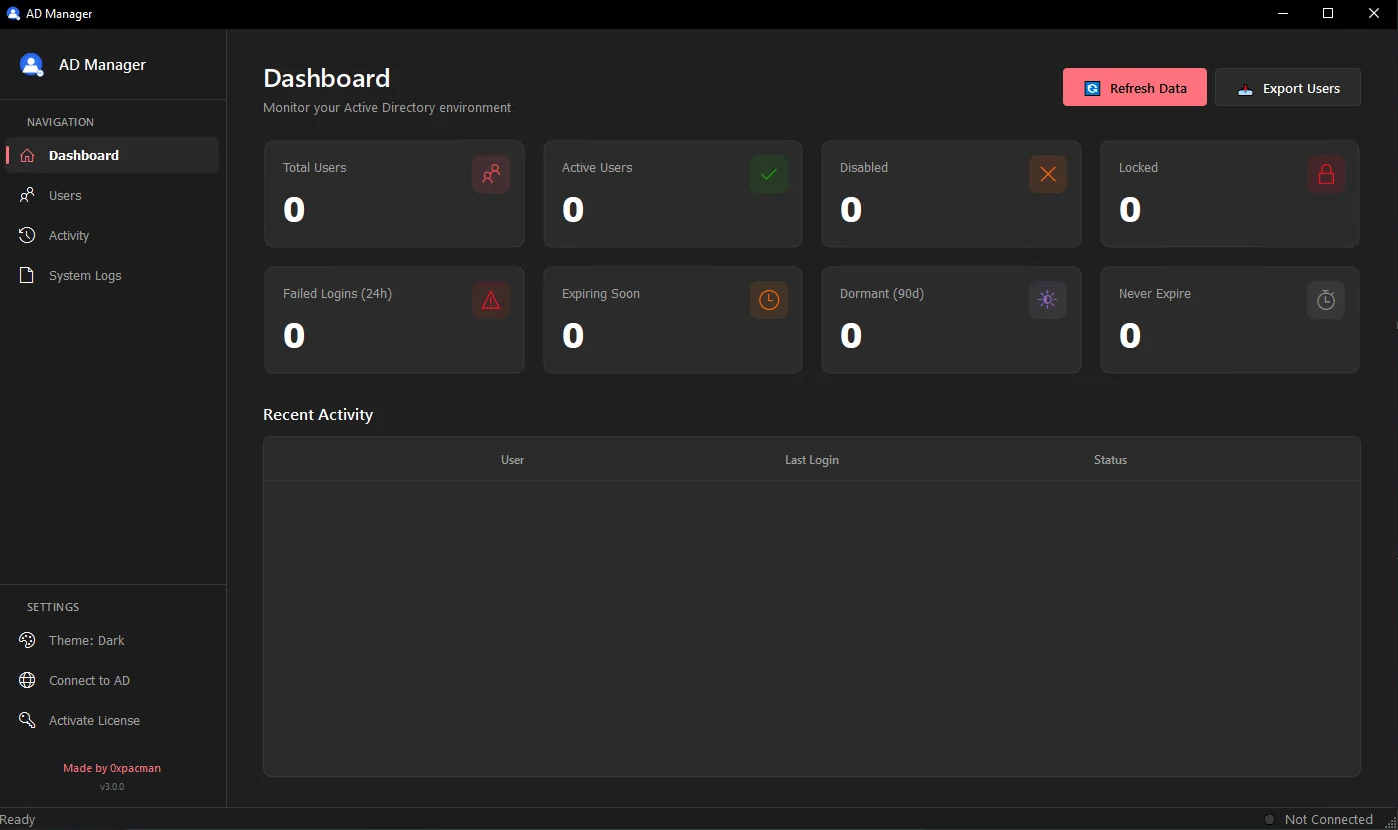
The engineering principles behind it:
- Native C++ & Qt. A real desktop binary. No Electron runtime, no background JVM, no UI stutter.
- Direct asynchronous LDAP engine. All network calls run off the main thread, so search, filtering, and navigation stay instant even across high-latency links.
- Built for the operator and the auditor. Instant inspection of
userAccountControlflags, bad password counts, last logon timestamps, and SPNs in one clean view (spot your Kerberoastable accounts at a glance). Nested and circular group resolution without writing recursive scripts. Unlock and password-reset workflows designed for speed, not clicks.
More features are on the way. This is v3 and the roadmap is active. If you run AD environments and have opinions, feedback is genuinely welcome: contact@0xpacman.com
6. Final Thoughts
Active Directory isn't going anywhere. It's the bedrock of identity in production enterprises, and treating it as legacy set-and-forget infrastructure is an open invitation to outages and incidents.
Design for resilience, structure your sites, secure your DNS, protect your FSMO roles. Harden systematically, enforce the tiering model, migrate to gMSAs, and watch Tier-0 modifications aggressively. And equip yourself with tooling that doesn't fight you, so you can spend your time on the work that actually matters.